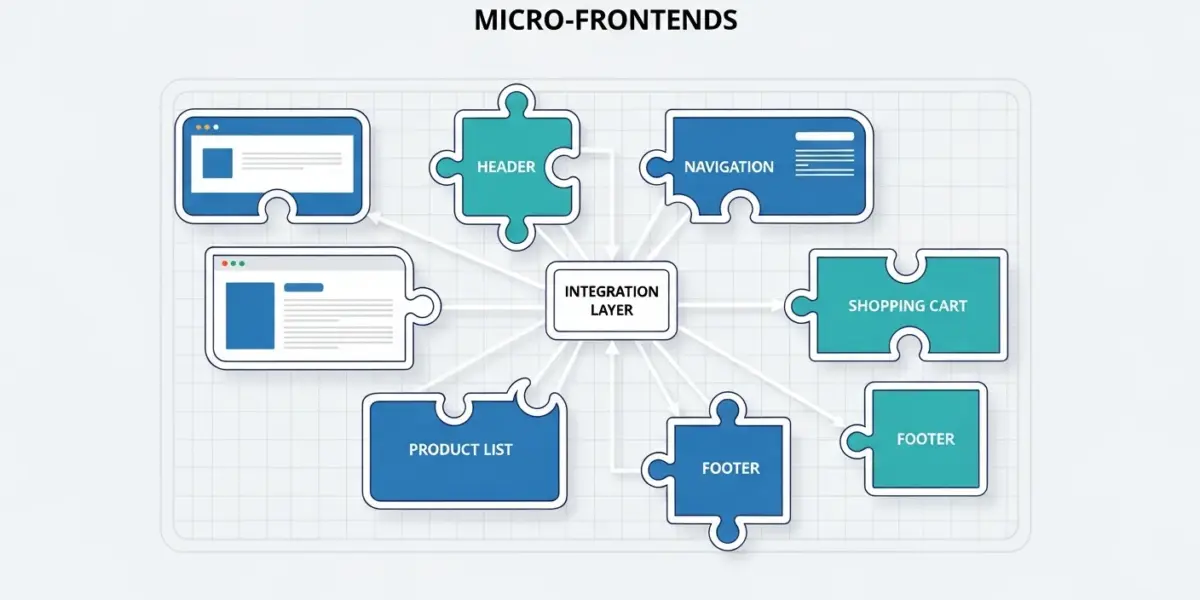
As web applications grow in complexity and team size, traditional monolithic frontend architectures become bottlenecks for development velocity. Micro-frontends extend the microservices philosophy to the frontend, allowing independent teams to build, deploy, and scale their portions of the application autonomously.
In this comprehensive guide, we’ll explore micro-frontend architecture from concept to production, covering implementation strategies, tools, and best practices that leading companies like Spotify, IKEA, and Zalando use to manage their massive frontend codebases.
What Are Micro-Frontends?
Micro-frontends are an architectural pattern where a frontend application is decomposed into smaller, semi-independent “micro” applications. Each micro-frontend:
- Is independently deployable
- Is owned by a single team
- Can use different technology stacks
- Has its own repository and CI/CD pipeline
- Communicates with others through well-defined contracts
Micro-Frontend vs Monolithic Frontend
| Aspect | Monolithic Frontend | Micro-Frontends |
|---|---|---|
| Deployment | All or nothing | Independent per team |
| Tech Stack | Single framework | Mix and match |
| Team Structure | Horizontal (frontend/backend) | Vertical (feature teams) |
| Codebase | Shared monorepo | Separate repos possible |
| Scaling Teams | Coordination overhead | Independent scaling |
| Time to Market | Blocked by releases | Ship anytime |
When Should You Use Micro-Frontends?
Good Fit For
- Large organizations with multiple frontend teams (5+ developers)
- Complex applications with distinct feature areas
- Legacy modernization – gradually replacing old frontends
- Multiple acquisition integrations – merging different tech stacks
- Platform teams providing shared capabilities
Not Recommended For
- Small teams (under 5 developers)
- Simple applications with limited features
- Projects with tight deadlines – setup overhead
- Teams lacking DevOps maturity
Micro-Frontend Implementation Strategies
There are several approaches to implementing micro-frontends, each with trade-offs:
1. Build-Time Integration
Micro-frontends are published as npm packages and composed at build time.
// package.json
{
  "dependencies": {
    "@team-a/header": "^1.2.0",
    "@team-b/product-list": "^2.1.0",
    "@team-c/checkout": "^1.5.0"
  }
}
Pros: Simple, familiar workflow, single deployment artifact
Cons: Requires rebuilding container for any update, tight coupling
2. Runtime Integration via iframes
Each micro-frontend runs in its own iframe, providing complete isolation.
<!-- Container application -->
<iframe src="https://team-a.example.com/header"></iframe>
<iframe src="https://team-b.example.com/products"></iframe>
<iframe src="https://team-c.example.com/checkout"></iframe>
Pros: Complete isolation, different frameworks, independent deployment
Cons: Performance overhead, styling limitations, complex communication
3. Runtime Integration via JavaScript (Module Federation)
Webpack Module Federation is the most popular approach in 2025, allowing runtime loading of separately compiled applications.
// webpack.config.js (Container)
const ModuleFederationPlugin = require('webpack').container.ModuleFederationPlugin;

module.exports = {
  plugins: [
    new ModuleFederationPlugin({
      name: 'container',
      remotes: {
        header: 'header@https://header.example.com/remoteEntry.js',
        products: 'products@https://products.example.com/remoteEntry.js',
        checkout: 'checkout@https://checkout.example.com/remoteEntry.js',
      },
      shared: ['react', 'react-dom'],
    }),
  ],
};
Pros: Shared dependencies, no iframe overhead, true independence
Cons: Webpack-specific (Vite now supports), complexity
4. Web Components
Using native Web Components as the integration layer provides framework-agnostic composition.
// Header micro-frontend (any framework)
class TeamAHeader extends HTMLElement {
  connectedCallback() {
    this.innerHTML = `<nav>...</nav>`;
  }
}
customElements.define('team-a-header', TeamAHeader);

// Container application
<team-a-header></team-a-header>
<team-b-products></team-b-products>
<team-c-checkout></team-c-checkout>
Pros: Framework-agnostic, native browser support, encapsulation
Cons: Learning curve, SSR complexity, styling challenges
5. Server-Side Composition
Micro-frontends are assembled on the server using edge workers or server-side includes.
<!-- Server-side template -->
<html>
  <body>
    <!--#include virtual="/header-service/header.html" -->
    <main>
      <!--#include virtual="/products-service/list.html" -->
    </main>
    <!--#include virtual="/checkout-service/cart.html" -->
  </body>
</html>
Pros: Fast initial load, SEO-friendly, works without JavaScript
Cons: Limited interactivity, infrastructure complexity
Module Federation Deep Dive
Module Federation is the most widely adopted solution for micro-frontends. Let’s implement a complete example.
Project Structure
micro-frontend-project/
├── container/           # Shell application
│   ├── src/
│   ├── webpack.config.js
│   └── package.json
├── header/              # Team A's micro-frontend
│   ├── src/
│   ├── webpack.config.js
│   └── package.json
├── products/            # Team B's micro-frontend
│   ├── src/
│   ├── webpack.config.js
│   └── package.json
└── checkout/            # Team C's micro-frontend
    ├── src/
    ├── webpack.config.js
    └── package.json
Header Micro-Frontend Configuration
// header/webpack.config.js
const ModuleFederationPlugin = require('webpack').container.ModuleFederationPlugin;

module.exports = {
  entry: './src/index',
  mode: 'development',
  devServer: {
    port: 3001,
  },
  output: {
    publicPath: 'http://localhost:3001/',
  },
  plugins: [
    new ModuleFederationPlugin({
      name: 'header',
      filename: 'remoteEntry.js',
      exposes: {
        './Header': './src/Header',
      },
      shared: {
        react: { singleton: true, eager: true },
        'react-dom': { singleton: true, eager: true },
      },
    }),
  ],
};
Container Application Configuration
// container/webpack.config.js
const ModuleFederationPlugin = require('webpack').container.ModuleFederationPlugin;

module.exports = {
  entry: './src/index',
  mode: 'development',
  devServer: {
    port: 3000,
  },
  plugins: [
    new ModuleFederationPlugin({
      name: 'container',
      remotes: {
        header: 'header@http://localhost:3001/remoteEntry.js',
        products: 'products@http://localhost:3002/remoteEntry.js',
        checkout: 'checkout@http://localhost:3003/remoteEntry.js',
      },
      shared: {
        react: { singleton: true, eager: true },
        'react-dom': { singleton: true, eager: true },
      },
    }),
  ],
};
Using Remote Components
// container/src/App.jsx
import React, { Suspense, lazy } from 'react';

// Lazy load remote micro-frontends
const Header = lazy(() => import('header/Header'));
const Products = lazy(() => import('products/ProductList'));
const Checkout = lazy(() => import('checkout/Cart'));

function App() {
  return (
    <div>
      <Suspense fallback="Loading header...">
        <Header />
      </Suspense>

      <main>
        <Suspense fallback="Loading products...">
          <Products />
        </Suspense>
      </main>

      <aside>
        <Suspense fallback="Loading cart...">
          <Checkout />
        </Suspense>
      </aside>
    </div>
  );
}

export default App;
Communication Between Micro-Frontends
Micro-frontends need to communicate while maintaining loose coupling. Here are the common patterns:
1. Custom Events
// Publishing (Products micro-frontend)
window.dispatchEvent(new CustomEvent('product:added', {
  detail: { productId: '123', quantity: 1 }
}));

// Subscribing (Checkout micro-frontend)
window.addEventListener('product:added', (event) => {
  console.log('Product added:', event.detail);
  updateCart(event.detail);
});
2. Shared State (Pub/Sub)
// Shared event bus (loaded by container)
class EventBus {
  constructor() {
    this.events = {};
  }

  subscribe(event, callback) {
    if (!this.events[event]) this.events[event] = [];
    this.events[event].push(callback);
  }

  publish(event, data) {
    if (this.events[event]) {
      this.events[event].forEach(cb => cb(data));
    }
  }
}

window.eventBus = new EventBus();

// Products micro-frontend
window.eventBus.publish('cart:update', { items: [...] });

// Checkout micro-frontend
window.eventBus.subscribe('cart:update', (data) => {
  renderCart(data.items);
});
3. URL/Route-Based Communication
// Products micro-frontend
function handleProductClick(productId) {
  // Navigate using shared router or URL
  window.history.pushState({}, '', `/products/${productId}`);
  window.dispatchEvent(new PopStateEvent('popstate'));
}

// Product detail micro-frontend reads from URL
const productId = window.location.pathname.split('/')[2];
Styling Strategies
CSS isolation is critical to prevent style conflicts between micro-frontends:
CSS Modules
// Header.module.css
.header {
  background: blue;
}

// Header.jsx
import styles from './Header.module.css';

function Header() {
  return <nav className={styles.header}>...</nav>;
}
CSS-in-JS with Scoping
// Using styled-components with namespace
import styled from 'styled-components';

const Header = styled.nav`
  && {
    background: blue;
  }
`;

// Or using Emotion with cache
import { CacheProvider } from '@emotion/react';
import createCache from '@emotion/cache';

const headerCache = createCache({ key: 'header-mf' });
Shadow DOM (Web Components)
class HeaderComponent extends HTMLElement {
  constructor() {
    super();
    // Attach shadow DOM for style isolation
    this.attachShadow({ mode: 'open' });
    this.shadowRoot.innerHTML = `
      <style>
        nav { background: blue; }
      </style>
      <nav>...</nav>
    `;
  }
}
Shared Dependencies Management
Avoid loading React (or other libraries) multiple times:
// webpack.config.js
new ModuleFederationPlugin({
  shared: {
    react: {
      singleton: true,        // Only one version
      requiredVersion: '^18.0.0',
      eager: false,           // Load lazily
    },
    'react-dom': {
      singleton: true,
      requiredVersion: '^18.0.0',
    },
    // Share design system
    '@company/design-system': {
      singleton: true,
      requiredVersion: '^2.0.0',
    },
  },
});
Testing Micro-Frontends
Unit Testing (In Isolation)
// Products micro-frontend test
import { render, screen } from '@testing-library/react';
import ProductList from './ProductList';

test('renders product list', () => {
  render(<ProductList products={mockProducts} />);
  expect(screen.getByText('Product 1')).toBeInTheDocument();
});
Integration Testing (Container + Remotes)
// Cypress e2e test
describe('Micro-frontend integration', () => {
  it('loads all micro-frontends', () => {
    cy.visit('/');
    cy.get('[data-mf="header"]').should('be.visible');
    cy.get('[data-mf="products"]').should('be.visible');
    cy.get('[data-mf="checkout"]').should('be.visible');
  });

  it('communication works between micro-frontends', () => {
    cy.get('[data-product-id="123"] button').click();
    cy.get('[data-mf="checkout"] .cart-count').should('contain', '1');
  });
});
CI/CD for Micro-Frontends
Each micro-frontend should have its own deployment pipeline:
# .github/workflows/header-deploy.yml
name: Deploy Header Micro-Frontend

on:
  push:
    paths:
      - 'header/**'
    branches: [main]

jobs:
  deploy:
    runs-on: ubuntu-latest
    steps:
      - uses: actions/checkout@v4

      - name: Install dependencies
        run: cd header && npm ci

      - name: Run tests
        run: cd header && npm test

      - name: Build
        run: cd header && npm run build

      - name: Deploy to CDN
        run: |
          aws s3 sync header/dist s3://mf-header/
          aws cloudfront create-invalidation --distribution-id ${{ secrets.CF_ID }}
Tools and Frameworks
Popular Micro-Frontend Frameworks
| Tool | Type | Best For |
|---|---|---|
| Module Federation | Webpack plugin | React/Vue apps, Webpack users |
| Single-spa | Meta-framework | Multi-framework, legacy integration |
| Piral | Framework | Enterprise portals |
| Qiankun | Framework | Chinese ecosystem, Ant Design |
| Luigi | Framework | SAP integrations |
| Bit | Component platform | Shared components |
Best Practices
- Define clear boundaries – Split by business domain, not technical layer
- Create a shared design system – Consistency across micro-frontends
- Establish communication contracts – Document events and APIs
- Version your contracts – Prevent breaking changes
- Monitor performance – Track bundle sizes and load times
- Implement error boundaries – Isolate failures
- Use feature flags – Safe rollouts and rollbacks
- Automate testing – Unit, integration, and e2e tests
Common Pitfalls to Avoid
- Nano-frontends – Don’t split too small; aim for team-sized chunks
- Shared state abuse – Minimize global state; prefer props/events
- Inconsistent UX – Maintain design system compliance
- Version conflicts – Align major dependency versions
- Missing contracts – Document all integration points
- Ignoring performance – Multiple micro-frontends can slow down pages
Conclusion
Micro-frontends enable large teams to work independently while delivering a cohesive user experience. The key to success is:
- Right-sizing your micro-frontends to team boundaries
- Choosing the appropriate integration strategy for your use case
- Investing in shared tooling and design systems
- Establishing clear contracts and governance
Start small—perhaps with one team’s feature area—and expand as you gain experience with the architecture.
Frequently Asked Questions
How many micro-frontends should I have?
Aim for one micro-frontend per team or major feature area. Most successful implementations have 3-10 micro-frontends, not dozens.
Can different micro-frontends use different frameworks?
Yes, but it’s not always recommended due to bundle size implications. It’s most useful for legacy migration scenarios.
How do I handle authentication across micro-frontends?
Use a shared authentication service and pass tokens through the container. JWT tokens in localStorage or HTTP-only cookies work well.
What about SEO with micro-frontends?
Use server-side composition or SSR at the container level. Tools like Module Federation now support SSR with modern frameworks like Next.js.
Planning a micro-frontend architecture for your organization? WebSeasoning specializes in modern frontend architectures, including micro-frontends, monorepo setups, and enterprise-scale applications. Contact us to discuss your project and get expert guidance on implementing micro-frontends the right way.